



ADVERTISEMENT
ADVERTISEMENT
HyperDroid HyperDroid
Category
PersonalizationTag
Win 11 Style Launcher | desktop experience | mobile convenience | Android transformation
Rate
4.80
★★★★★
Reviews
500 +
Installs
1M +
Developer
binary inc.
Content Rating
Everyone
Get ready for the desktop experience.
 APK
APK  Google Play
  iOS
iOS  4.80
4.80ADVERTISEMENT
ADVERTISEMENT
Author's Review
appspicked Review
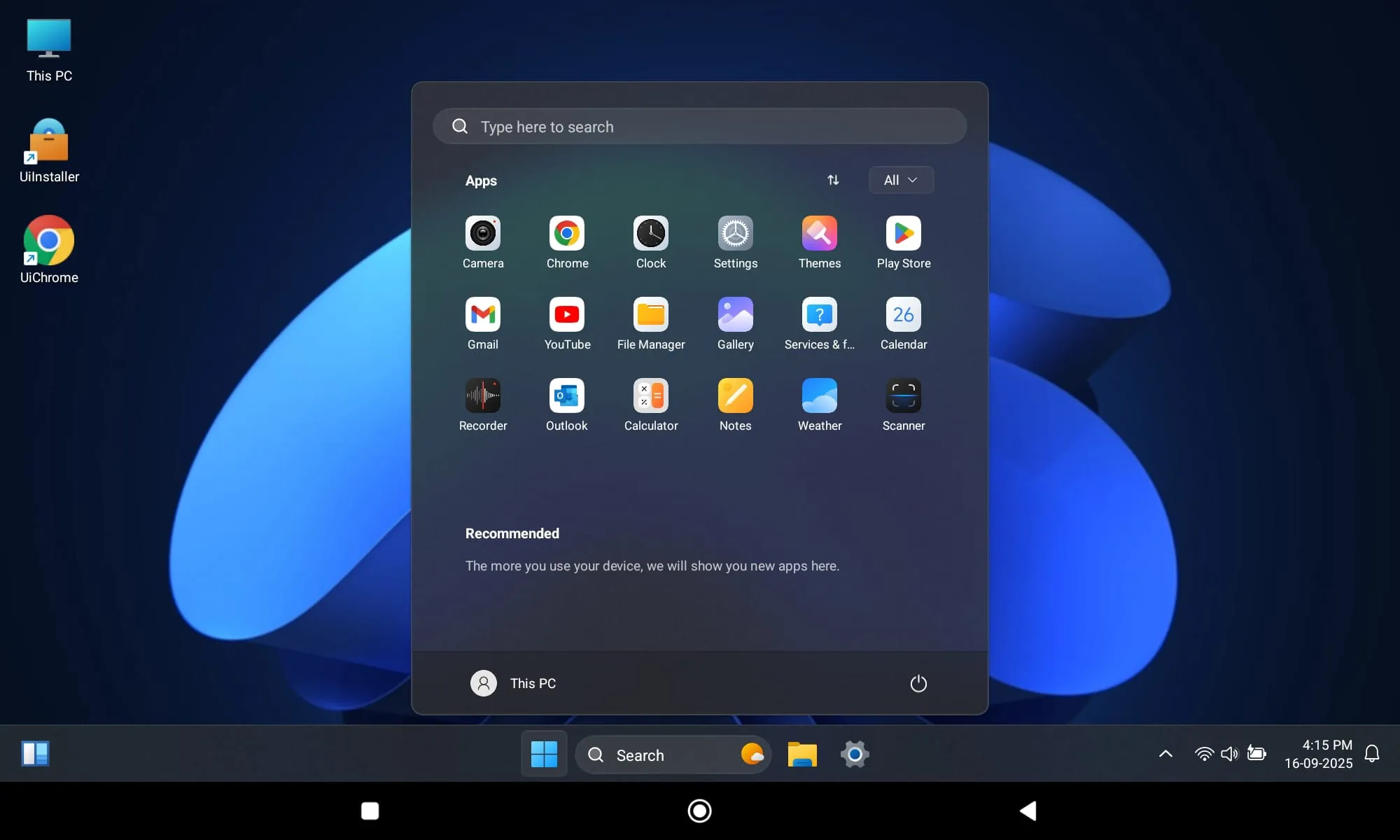
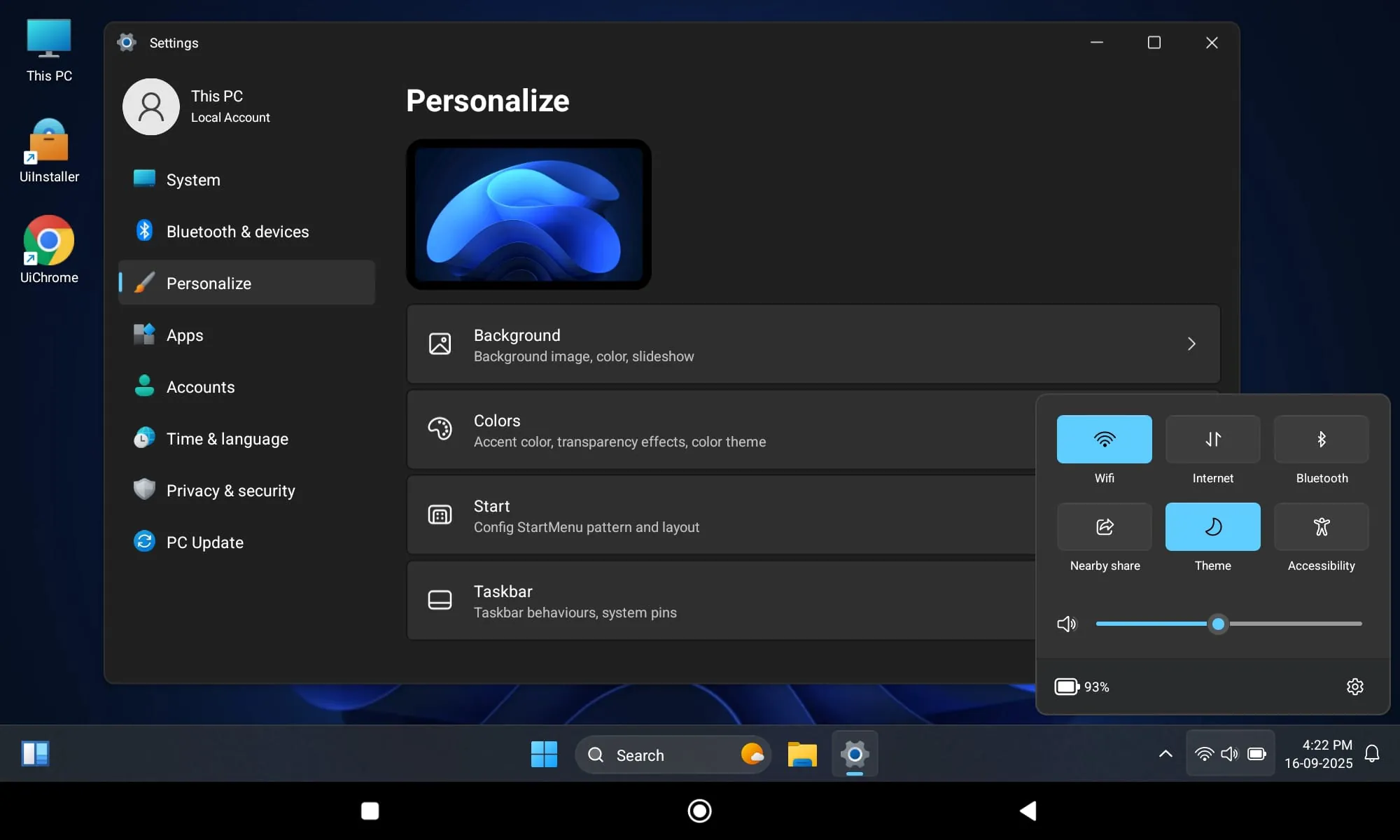
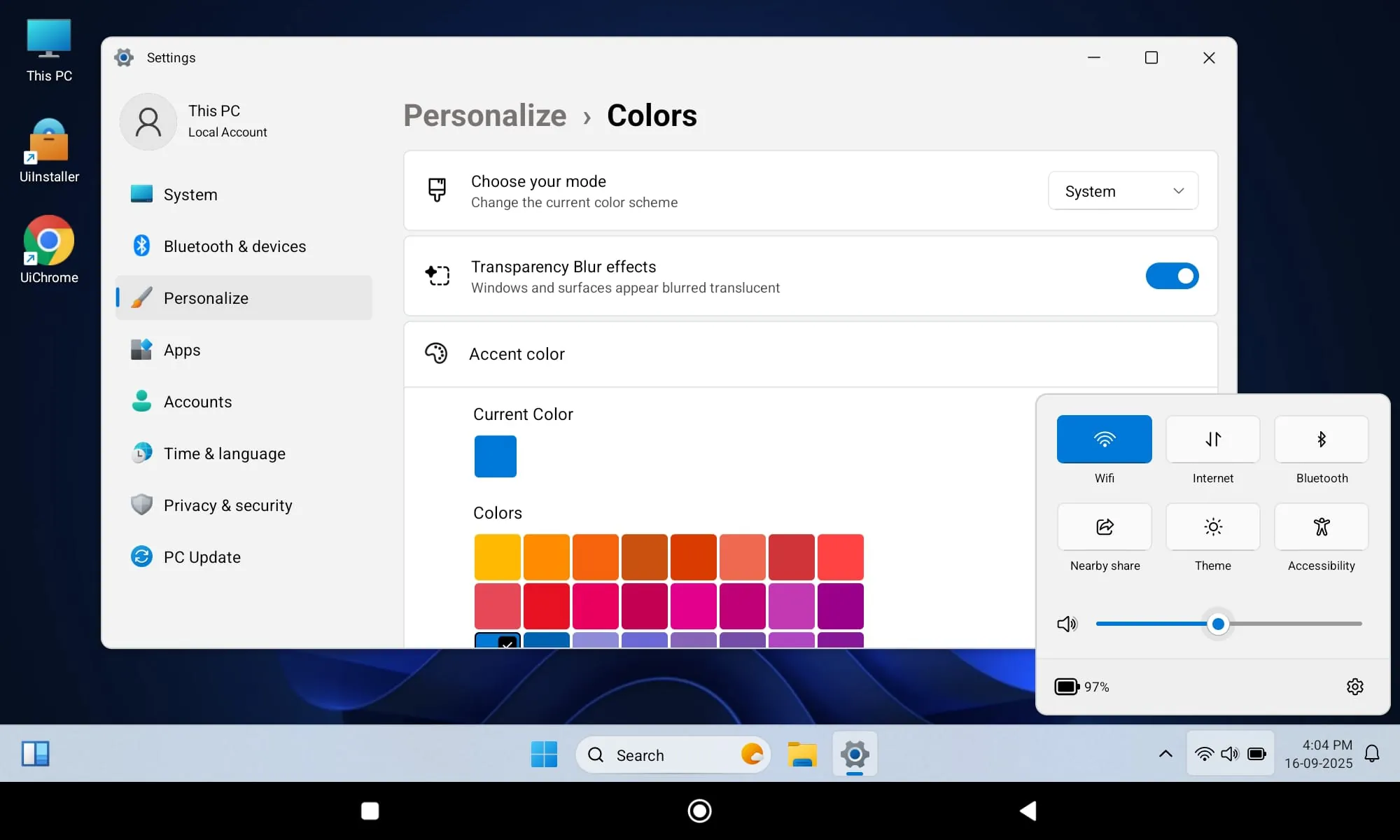
The Win 11 Style Launcher represents a paradigm shift in mobile device usability, effectively bridging the gap between traditional desktop computing and the ubiquitous accessibility of smartphones. This innovative application transforms the Android operating system into a comprehensive desktop environment, offering users a familiar and intuitive interface that mirrors the Windows 11 experience. By replicating the visual aesthetics, organizational structure, and functional capabilities of a desktop PC, the launcher empowers users to perform complex tasks, manage files efficiently, and engage with applications in a manner that transcends the limitations typically associated with mobile devices. The seamless integration of desktop features onto a handheld platform fosters enhanced productivity, streamlined workflows, and a more versatile user experience. Users can access a robust start menu, navigate through resizable windows, and utilize a taskbar for efficient application management, all within the familiar context of a desktop-like interface. This transformation extends beyond mere visual replication; the Win 11 Style Launcher optimizes performance, enhances multitasking capabilities, and provides a suite of customization options that allow users to tailor the environment to their specific needs and preferences. The ability to seamlessly switch between desktop and mobile modes ensures adaptability to various usage scenarios, catering to both professional demands and personal entertainment. Furthermore, the launcher prioritizes security and data privacy, incorporating advanced protection measures to safeguard user information and maintain system integrity. The Win 11 Style Launcher is not merely an aesthetic enhancement; it is a comprehensive solution that redefines the capabilities of Android devices, transforming them into powerful, versatile, and user-friendly computing platforms that rival the functionality of traditional desktop PCs. The implications of this transformation are far-reaching, potentially impacting how individuals interact with technology, conduct business, and manage their daily lives. The convergence of desktop and mobile functionalities represents a significant step towards a future where computing is seamless, accessible, and adaptable to the diverse needs of users across the globe. The launcher's emphasis on user-centric design, coupled with its robust performance and security features, positions it as a frontrunner in the evolution of mobile operating systems, paving the way for a new era of mobile productivity and digital empowerment. The application's ability to mimic the Windows 11 environment fosters a sense of familiarity and ease of use, particularly for users accustomed to the Windows operating system. This familiarity reduces the learning curve and allows users to quickly adapt to the new interface, maximizing their productivity and minimizing frustration. The Win 11 Style Launcher is more than just an application; it's a gateway to a more efficient, versatile, and user-friendly mobile computing experience. By seamlessly integrating the best features of desktop and mobile environments, the launcher empowers users to unlock the full potential of their Android devices and experience the future of computing, today. The attention to detail in replicating the Windows 11 interface is remarkable, from the smooth animations and transitions to the carefully crafted icons and visual elements. This commitment to authenticity enhances the user experience and creates a sense of immersion, making users feel as though they are truly interacting with a desktop PC on their mobile device. The launcher also includes a variety of customization options, allowing users to personalize their desktop environment and tailor it to their specific needs and preferences. Users can change the theme, adjust the icon size, and customize the taskbar, creating a unique and personalized experience that reflects their individual style.
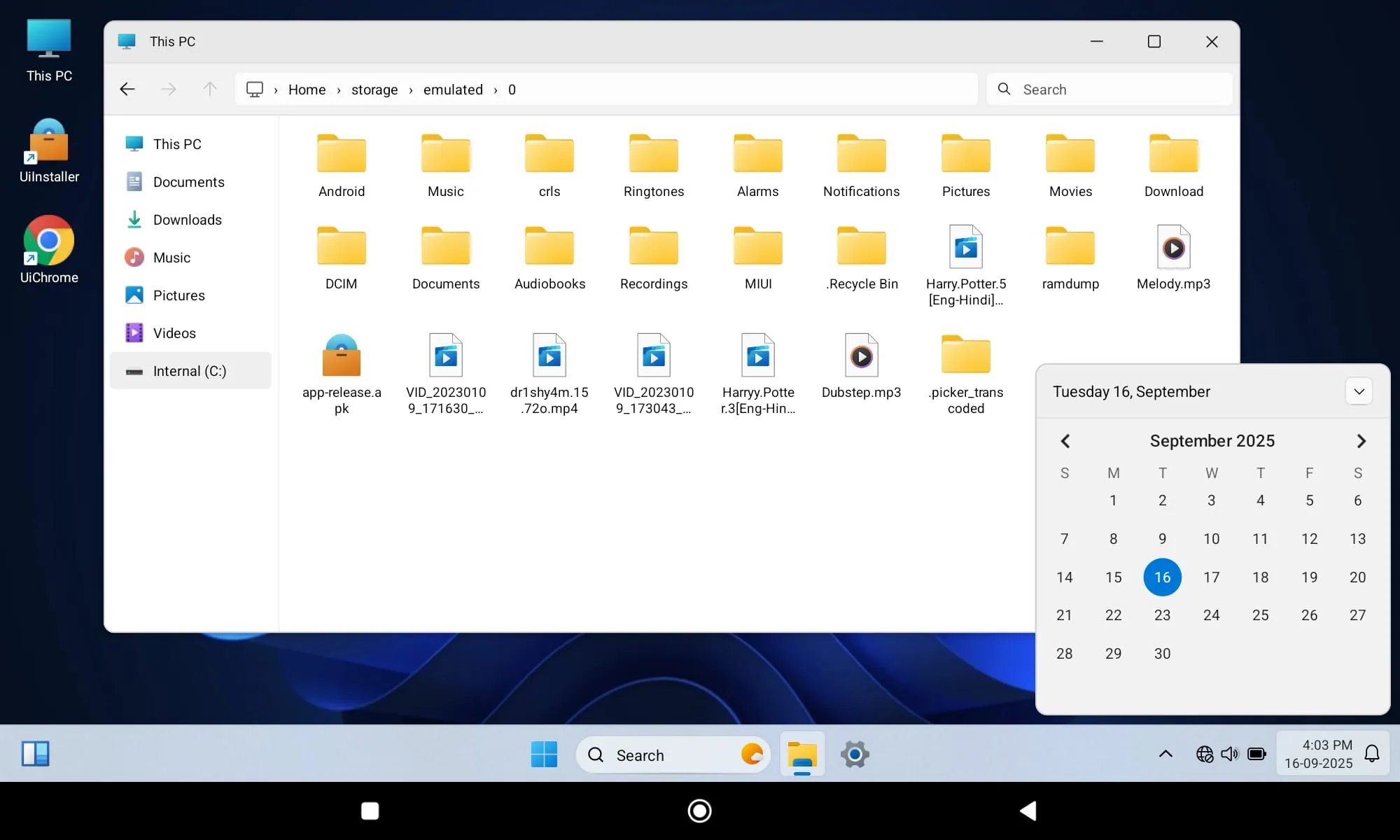
The essence of the Win 11 Style Launcher lies in its ability to deliver a desktop-class experience on an Android device, thereby blurring the lines between mobile and desktop computing. This transformation is not superficial; it encompasses a deep integration of functionalities that are traditionally associated with desktop operating systems. File management, for instance, is significantly enhanced with the inclusion of features such as drag-and-drop, multi-window support, and advanced search capabilities. Users can effortlessly organize, copy, and move files, mirroring the efficiency of a desktop environment. Multitasking is also revolutionized, allowing users to run multiple applications simultaneously in resizable windows, fostering a productive and seamless workflow. The ability to quickly switch between applications and manage them through a centralized taskbar enhances efficiency and reduces the cognitive load on the user. Furthermore, the Win 11 Style Launcher introduces a sophisticated start menu, providing quick access to frequently used applications, system settings, and other essential functions. The start menu is customizable, allowing users to pin their favorite applications and organize them into logical groups. This level of customization ensures that the most important tools are always readily accessible, streamlining the user experience and maximizing productivity. The launcher also includes a range of desktop-specific utilities, such as a calculator, a calendar, and a file explorer, further enhancing its functionality and versatility. These utilities are seamlessly integrated into the desktop environment, providing users with a comprehensive suite of tools for managing their digital lives. In addition to its functional capabilities, the Win 11 Style Launcher also prioritizes aesthetics, replicating the sleek and modern design of the Windows 11 operating system. The launcher's visual elements, including its icons, wallpapers, and animations, are carefully crafted to create a cohesive and visually appealing desktop environment. This attention to detail enhances the user experience and makes the launcher a pleasure to use. The transformation of an Android device into a desktop environment is not without its challenges. Mobile devices have limited processing power and memory compared to desktop PCs, which can impact performance. The Win 11 Style Launcher addresses this challenge through a variety of optimization techniques, ensuring that the launcher runs smoothly and efficiently on a wide range of Android devices. The launcher also includes a battery-saving mode, which optimizes power consumption and extends battery life. By carefully balancing performance and power efficiency, the Win 11 Style Launcher delivers a desktop-class experience without compromising the battery life of the mobile device. The application's developers have invested significant effort in ensuring that the launcher is stable, reliable, and secure, providing users with a worry-free computing experience. Regular updates are released to address bugs, improve performance, and add new features, demonstrating the developers' commitment to continuous improvement. The Win 11 Style Launcher is not simply a launcher; it is a complete desktop environment that transforms an Android device into a powerful, versatile, and user-friendly computing platform. Its seamless integration of desktop features, coupled with its sleek design and robust performance, makes it an ideal choice for users who want to experience the best of both worlds.
The implications of transforming an Android device into a desktop environment extend far beyond mere convenience. The Win 11 Style Launcher has the potential to revolutionize how individuals interact with technology, conduct business, and manage their daily lives. For professionals, the launcher provides a powerful tool for productivity, enabling them to work more efficiently and effectively on the go. The ability to run multiple applications simultaneously, manage files with ease, and access a range of desktop-specific utilities empowers professionals to tackle complex tasks and stay productive, regardless of their location. Students can also benefit from the Win 11 Style Launcher, using it to create a more focused and productive learning environment. The launcher's desktop-like interface can help students stay organized, manage their assignments, and access educational resources with ease. Furthermore, the launcher's multitasking capabilities allow students to conduct research, write essays, and collaborate with classmates more effectively. The Win 11 Style Launcher can also be a valuable tool for individuals with disabilities, providing them with a more accessible and user-friendly computing experience. The launcher's customizable interface and range of accessibility features can help individuals with visual impairments, motor impairments, and cognitive impairments to use their Android devices more effectively. For example, the launcher's large fonts, high-contrast themes, and voice-activated controls can make it easier for individuals with visual impairments to navigate the interface and access information. The Win 11 Style Launcher has the potential to bridge the digital divide, providing access to computing resources for individuals who may not have access to a traditional desktop PC. By transforming affordable Android devices into powerful computing platforms, the launcher can empower individuals in developing countries and underserved communities to access education, employment, and other essential services. The launcher can also be used to create a more sustainable and eco-friendly computing environment. By extending the lifespan of Android devices and reducing the need for traditional desktop PCs, the launcher can help reduce electronic waste and conserve resources. The Win 11 Style Launcher is not just an application; it is a transformative technology that has the potential to improve the lives of individuals around the world. Its ability to bridge the gap between mobile and desktop computing, coupled with its accessibility features and eco-friendly design, makes it a valuable tool for professionals, students, individuals with disabilities, and communities around the globe. The future of computing is mobile, and the Win 11 Style Launcher is at the forefront of this revolution. By seamlessly integrating the best features of desktop and mobile environments, the launcher is paving the way for a new era of computing that is more accessible, versatile, and sustainable. The continuous development and improvement of the launcher, with regular updates and new features, demonstrate the commitment of the developers to providing users with the best possible experience. The Win 11 Style Launcher is more than just an application; it is a vision of the future of computing, a vision where technology is accessible, empowering, and sustainable for all.
Screenshots
 Download
 Additional Information
Category
PersonalizationVersion
Unknown
Tag
Win 11 Style Launcher | desktop experience | mobile convenience | Android transformation
Rate
4.80
★★★★★
Reviews
500 +
Installs
1M +
Developer
binary inc.
Content Rating
Everyone
Get ready for the desktop experience.
ADVERTISEMENT
ADVERTISEMENT
Previous Versions
ZIP files require a Split APKs Installer (e.g., SAI) from Google Play to install. Steps: 1. Download SAI from Google Play; 2. Open SAI and tap "Install APKs"; 3. Select the ZIP file; 4. Complete installation.
ADVERTISEMENT
You Might Like









