TrebEdit emerges as a multifaceted HTML editor meticulously crafted to facilitate web design endeavors, catering to both novice and seasoned developers. At its core, TrebEdit empowers users to embark on new web projects with an intuitive interface and a comprehensive suite of features. The in-app browser, aptly named the HTML Viewer, provides a seamless environment for previewing and scrutinizing code implementations, enabling real-time adjustments and refinements. This immediate feedback loop accelerates the development process, allowing developers to visualize the impact of their code modifications instantaneously. Furthermore, TrebEdit extends its utility beyond mere code editing by incorporating project export capabilities, allowing users to save their projects locally on their devices, ensuring accessibility and portability. This feature underscores TrebEdit's commitment to accommodating diverse workflows, providing developers with the flexibility to manage and deploy their projects according to their specific preferences. Beyond its fundamental HTML editing capabilities, TrebEdit transcends the limitations of a conventional text editor by incorporating a source code viewer. This functionality enables users to extract HTML or source code from any website, offering a valuable resource for learning, inspiration, and project development. The extracted code can be seamlessly integrated into new projects or opened directly within the text editor for further examination and modification. This capability fosters a collaborative environment, enabling developers to leverage existing code structures and adapt them to their own unique requirements. TrebEdit's inclusion of a JavaScript console further enhances its appeal, providing developers with a dedicated space for executing and debugging JavaScript code snippets, ensuring seamless integration of dynamic functionality into web projects. This console facilitates real-time experimentation and troubleshooting, allowing developers to identify and resolve code errors swiftly and efficiently. The learn-to-code feature of TrebEdit is a testament to its commitment to fostering web development education. This feature provides users with a structured learning environment encompassing essential web technologies such as HTML, CSS, JavaScript, and PHP. The learn-to-code module caters to both beginners seeking to embark on their web development journey and experienced developers looking to refresh their knowledge or acquire new skills. TrebEdit's holistic approach to web development is further reflected in its user-friendly interface and intuitive design, ensuring accessibility for users of all skill levels. The editor's clean and uncluttered layout minimizes distractions, allowing developers to focus on the task at hand. Its comprehensive feature set, coupled with its ease of use, makes TrebEdit an indispensable tool for web developers seeking a versatile and efficient HTML editor.
Delving deeper into TrebEdit's capabilities, its text editor serves as the primary workspace for crafting and manipulating HTML, CSS, and JavaScript code. The editor is designed with user experience in mind, featuring syntax highlighting, code completion, and auto-indentation to streamline the coding process. Syntax highlighting visually differentiates various code elements, such as tags, attributes, and values, making it easier to identify and correct errors. Code completion suggests relevant code snippets as the user types, reducing the need for manual typing and minimizing the risk of typos. Auto-indentation automatically formats code blocks, ensuring consistent code structure and readability. These features collectively enhance the coding experience, allowing developers to write code more efficiently and accurately. The HTML viewer provides a real-time preview of the rendered HTML code, enabling developers to visualize the visual output of their code as they type. This feature is particularly useful for debugging and fine-tuning the layout and design of web pages. The HTML viewer supports various rendering modes, allowing developers to simulate different browser environments and ensure cross-browser compatibility. Furthermore, the HTML viewer can be used to inspect the DOM (Document Object Model) of a web page, providing valuable insights into the structure and organization of the code. The JavaScript console provides a dedicated environment for executing and debugging JavaScript code. Developers can use the console to test code snippets, inspect variables, and track down errors. The console supports various debugging features, such as breakpoints and step-through execution, allowing developers to pinpoint the exact location of errors in their code. The source code viewer enables users to extract the source code of any website, providing a valuable resource for learning and inspiration. Developers can use the source code viewer to study the code structure and design patterns of successful websites. The extracted code can be used as a starting point for new projects or as a reference for improving existing code. TrebEdit's learn-to-code feature provides a structured learning environment for aspiring web developers. The feature includes tutorials and exercises covering essential web technologies such as HTML, CSS, JavaScript, and PHP. The tutorials are designed to be easy to follow and understand, making them suitable for beginners with no prior coding experience. The exercises provide hands-on practice, allowing users to apply what they have learned and reinforce their understanding of the concepts.
Furthermore, TrebEdit distinguishes itself through its commitment to user accessibility and convenience. The application boasts a responsive design, adapting seamlessly to various screen sizes and orientations, ensuring optimal usability across a wide range of devices, from smartphones and tablets to desktop computers. This responsiveness allows developers to work on their projects on the go, without compromising on functionality or user experience. TrebEdit also incorporates cloud synchronization capabilities, enabling users to seamlessly synchronize their projects across multiple devices. This feature ensures that developers can access their latest code changes and project files regardless of their location or the device they are using. The cloud synchronization feature also provides a backup mechanism, safeguarding against data loss in case of device failure or accidental deletion. TrebEdit's user interface is designed with simplicity and intuitiveness in mind. The interface is clean and uncluttered, minimizing distractions and allowing developers to focus on their code. The application features a customizable code editor, allowing users to adjust the font size, color scheme, and other settings to their preferences. TrebEdit also supports various keyboard shortcuts, enabling developers to perform common tasks quickly and efficiently. In addition to its core features, TrebEdit also offers a range of additional tools and utilities to enhance the web development workflow. These tools include a code formatter, a code validator, and a code minifier. The code formatter automatically formats code according to predefined rules, ensuring consistent code style and readability. The code validator checks code for errors and inconsistencies, helping developers to identify and fix problems before they cause issues. The code minifier removes unnecessary characters from code, reducing file size and improving website performance. TrebEdit's versatility and comprehensive feature set make it an invaluable tool for web developers of all skill levels. Whether you are a beginner just starting out or an experienced professional, TrebEdit provides the tools and resources you need to create stunning and functional web applications. The application's intuitive interface, responsive design, and cloud synchronization capabilities make it a pleasure to use, while its wide range of features and utilities ensure that you have everything you need to get the job done. TrebEdit is continuously evolving, with new features and improvements being added regularly. The development team is committed to providing users with the best possible web development experience.





 APK
APK  Google Play
  iOS
iOS  4.00
4.00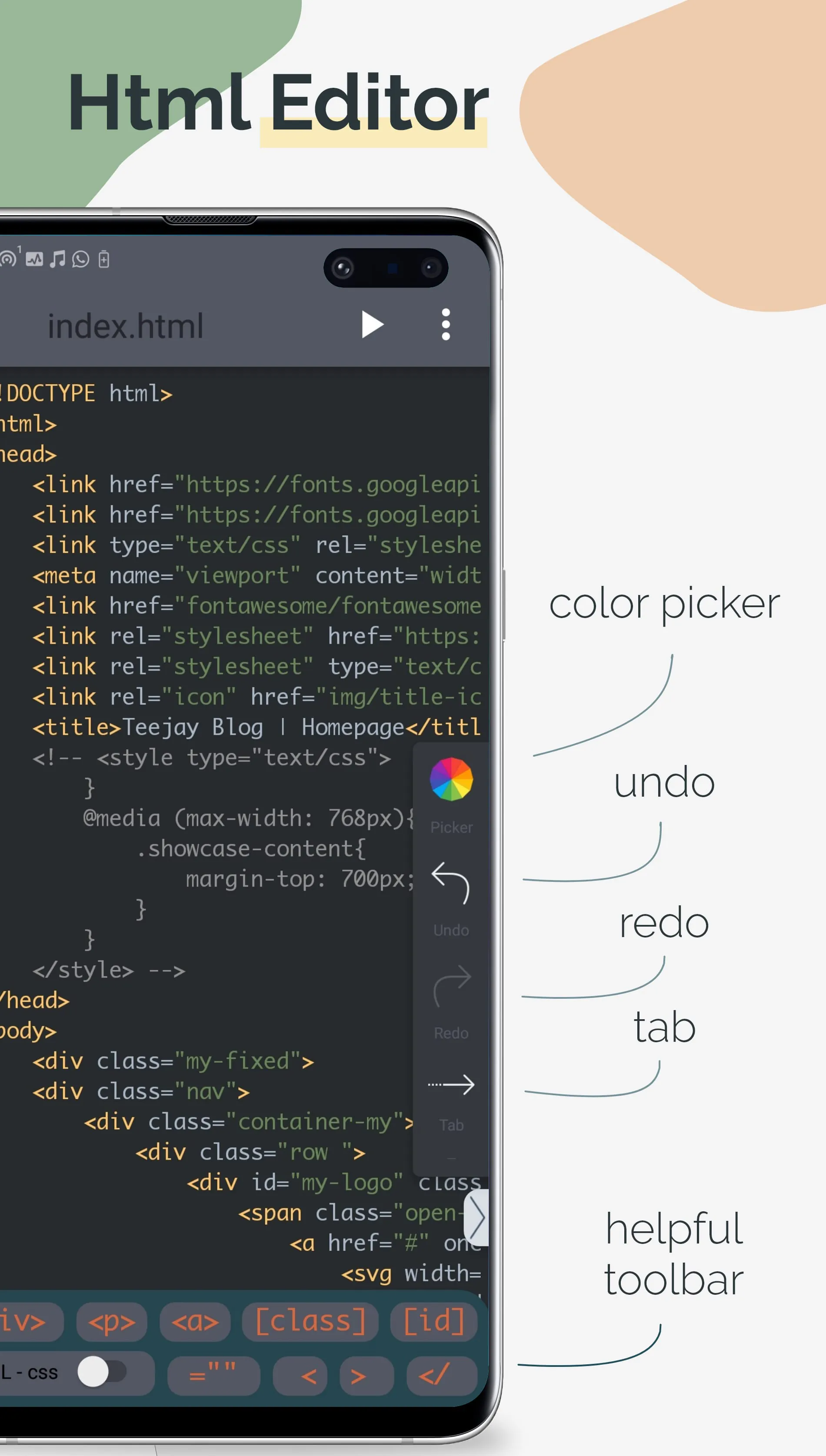


 Download








