



ADVERTISEMENT
ADVERTISEMENT

Windows Calculator Windows Calculator
Category
ToolsTag
Windows 10 Calculator | Math tasks | Unit converters | History management | Base conversion
Rate
2.90
★★★★★
Reviews
500 +
Installs
10k +
Developer
Arbaz Rizvi
Content Rating
Everyone
Windows based calculator app
 APK
APK  Google Play
  iOS
iOS  2.90
2.90ADVERTISEMENT
ADVERTISEMENT
Author's Review
appspicked Review
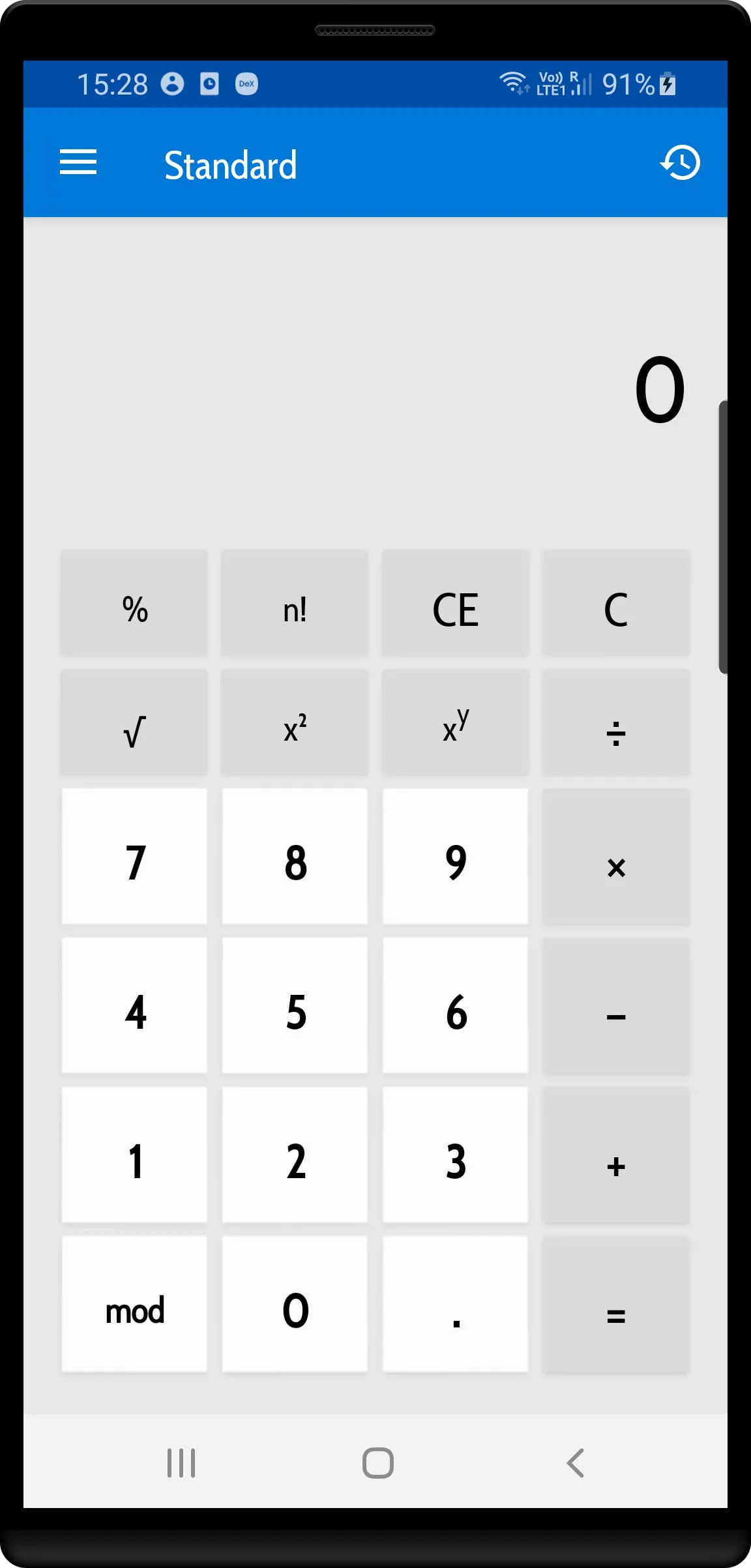
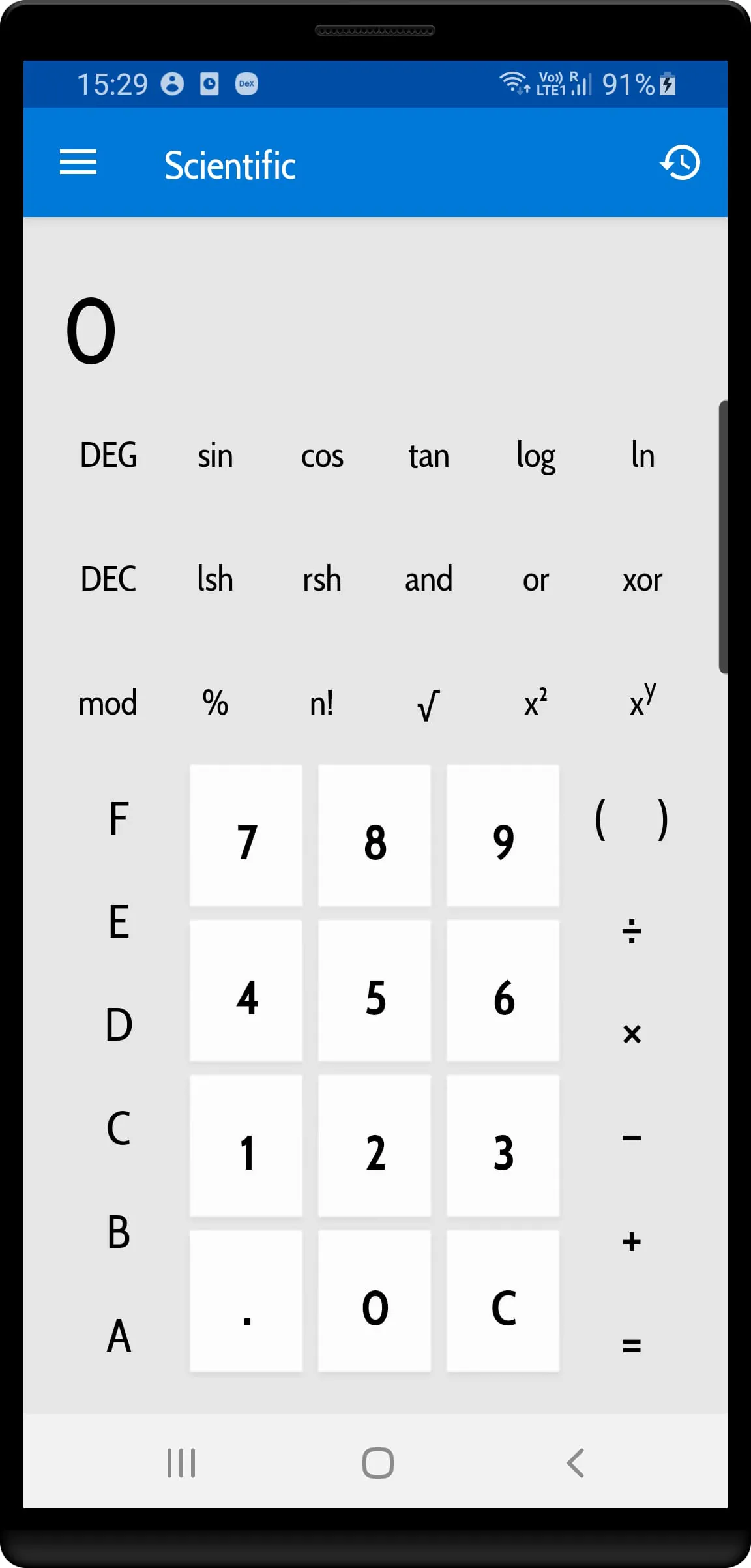
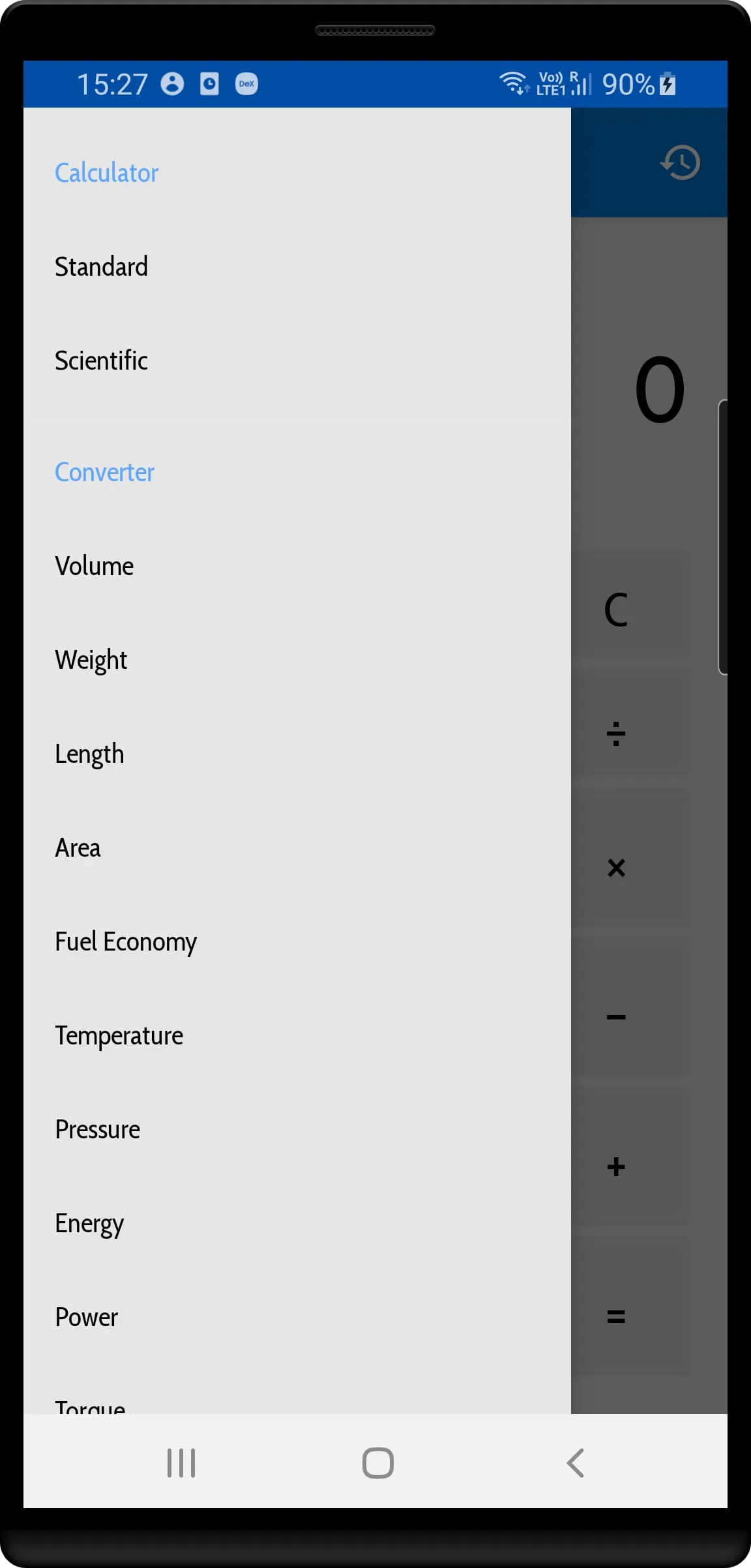
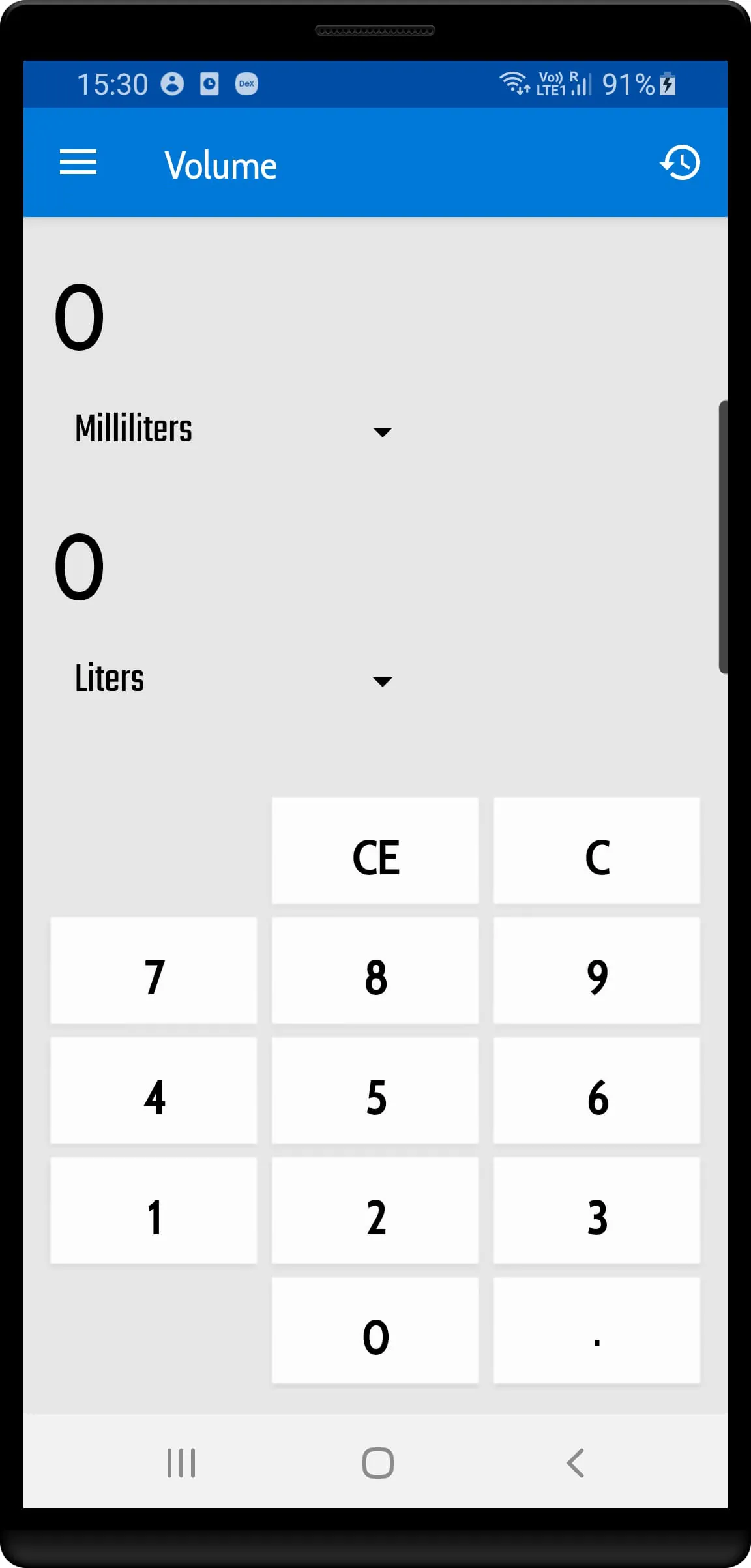
This application presents itself as a calculator solution heavily inspired by the design and functionality of the Windows 10 calculator application. Its primary function is to enable users to perform a wide array of mathematical tasks, ranging from basic arithmetic operations to more complex calculations, all within an environment that prioritizes aesthetic design. The application seems to be targeting users who appreciate a visually appealing interface alongside robust mathematical capabilities. One of the key features highlighted is history management, which suggests that the application keeps a record of past calculations, allowing users to easily recall and review previous operations. This can be particularly useful for tasks that require multiple steps or for users who frequently need to refer back to earlier calculations. The inclusion of base conversion functionality indicates that the application can convert numbers between different numeral systems, such as binary, decimal, and hexadecimal. This feature is often valued by programmers, engineers, and anyone working with computer systems or digital data. The mention of memory functionality suggests that the application allows users to store and recall numbers, similar to the memory functions found on traditional calculators. This can be helpful for storing intermediate results or frequently used constants. The application extends beyond basic calculator functions by incorporating a variety of unit converters. These converters enable users to easily convert values between different units of measurement for various physical quantities, such as volume, weight, length, and area. The inclusion of unit converters significantly expands the application's utility, making it a versatile tool for a wide range of users and applications. The specific unit converters listed include volume, weight, length, area, fuel economy, temperature, pressure, energy, power, torque, speed, time, data, and angle. This comprehensive selection covers many of the most commonly used units of measurement in science, engineering, and everyday life. The presence of fuel economy conversion suggests that the application caters to users interested in automotive applications or fuel consumption analysis. Temperature conversion is a standard feature that allows users to switch between different temperature scales, such as Celsius, Fahrenheit, and Kelvin. Pressure conversion is useful for applications involving fluid mechanics, meteorology, or industrial processes. Energy conversion is relevant to physics, engineering, and energy-related calculations. Power conversion is commonly used in electrical engineering and other fields dealing with energy transfer rates. Torque conversion is important in mechanical engineering and automotive applications. Speed conversion is a basic feature that allows users to convert between different units of speed, such as miles per hour and kilometers per hour. Time conversion is a standard feature for converting between different units of time, such as seconds, minutes, hours, and days. Data conversion is relevant to computer science and data storage applications, allowing users to convert between different units of data size, such as bytes, kilobytes, and megabytes. Angle conversion is important in trigonometry, geometry, and various engineering applications. The inclusion of 'etc.' at the end of the list implies that the application may support even more unit converters beyond those explicitly mentioned, further enhancing its versatility.
The description emphasizes the application's design, drawing a direct comparison to the familiar interface of the Windows 10 calculator. This suggests that the developers have prioritized user experience, aiming to create an application that is both functional and visually appealing. The focus on a beautiful design indicates an understanding of the importance of aesthetics in modern software applications. By mimicking the look and feel of the Windows 10 calculator, the application may appeal to users who are already familiar with that interface, reducing the learning curve and making it easier to adopt. The ability to perform simple and complex math tasks positions the application as a versatile tool suitable for a wide range of users, from students performing basic calculations to professionals engaged in more advanced mathematical analysis. The history management feature is a valuable addition that enhances the application's usability. By keeping a record of past calculations, users can easily review their work, identify errors, and reuse previous results. This feature can be particularly helpful for complex calculations that involve multiple steps or for tasks that require repeated calculations with slightly different inputs. The base conversion functionality is a specialized feature that caters to a specific audience, including programmers, engineers, and anyone working with digital data. The ability to convert numbers between different numeral systems is essential for tasks such as data representation, low-level programming, and hardware design. The memory function is a standard feature found on most calculators, allowing users to store and recall numbers for later use. This is particularly helpful for calculations that involve intermediate results or frequently used constants. The extensive list of unit converters significantly expands the application's utility, making it a valuable tool for a wide range of users and applications. The inclusion of converters for volume, weight, length, area, fuel economy, temperature, pressure, energy, power, torque, speed, time, data, and angle demonstrates the application's comprehensive coverage of commonly used units of measurement. The presence of fuel economy conversion suggests that the application caters to users interested in automotive applications or fuel consumption analysis. This feature can be useful for calculating fuel efficiency, comparing different vehicles, or planning road trips. Temperature conversion is a standard feature that allows users to switch between different temperature scales, such as Celsius, Fahrenheit, and Kelvin. This is particularly useful for users who need to work with temperature data from different sources or who travel to different countries. Pressure conversion is useful for applications involving fluid mechanics, meteorology, or industrial processes. This feature can be used to convert between different units of pressure, such as Pascals, atmospheres, and pounds per square inch. Energy conversion is relevant to physics, engineering, and energy-related calculations. This feature can be used to convert between different units of energy, such as Joules, calories, and kilowatt-hours. Power conversion is commonly used in electrical engineering and other fields dealing with energy transfer rates. This feature can be used to convert between different units of power, such as Watts, horsepower, and kilowatts. Torque conversion is important in mechanical engineering and automotive applications. This feature can be used to convert between different units of torque, such as Newton-meters and pound-feet. Speed conversion is a basic feature that allows users to convert between different units of speed, such as miles per hour and kilometers per hour. This is useful for travel, sports, and other applications where speed is a relevant factor.
Time conversion is a standard feature for converting between different units of time, such as seconds, minutes, hours, and days. This is a basic feature that is useful for a wide range of applications, from scheduling appointments to analyzing data. Data conversion is relevant to computer science and data storage applications, allowing users to convert between different units of data size, such as bytes, kilobytes, and megabytes. This is essential for managing digital data, understanding storage capacity, and transferring files. Angle conversion is important in trigonometry, geometry, and various engineering applications. This feature can be used to convert between different units of angle, such as degrees, radians, and gradians. The inclusion of 'etc.' at the end of the list implies that the application may support even more unit converters beyond those explicitly mentioned, further enhancing its versatility and catering to a wider range of user needs. The application's overall design philosophy appears to be centered around providing a comprehensive and user-friendly calculator solution that combines a visually appealing interface with a wide range of mathematical and unit conversion capabilities. The focus on both design and functionality suggests that the developers have aimed to create an application that is both powerful and easy to use. The inclusion of features such as history management, base conversion, and memory functions further enhances the application's utility and makes it a valuable tool for a wide range of users. The extensive list of unit converters demonstrates the application's versatility and its ability to cater to a diverse set of needs. By providing a single application that can handle both mathematical calculations and unit conversions, the developers have created a convenient and efficient tool for users who frequently need to perform these types of tasks. The application's design, which is inspired by the Windows 10 calculator, suggests that the developers have prioritized user familiarity and ease of use. By mimicking the look and feel of a widely used calculator application, the application may be easier to learn and use for many users. The application's combination of features, design, and functionality makes it a compelling choice for users who are looking for a versatile and user-friendly calculator solution. Whether you are a student, a professional, or simply someone who needs to perform calculations or unit conversions on a regular basis, this application may be a valuable tool to have at your disposal. The emphasis on a 'beautifully designed application' suggests that the user experience has been given a high priority, making it more enjoyable to use the calculator for both simple and complex tasks. The history management feature addresses a common need for users who often need to refer back to previous calculations, saving time and effort. The base conversion capability caters to a more specialized audience, making the calculator a useful tool for programmers and those working with different numeral systems. The memory function provides a convenient way to store and recall numbers, simplifying complex calculations. The wide range of unit converters, covering various physical quantities, expands the calculator's utility beyond basic arithmetic and makes it a versatile tool for a variety of applications. The attention to detail, as indicated by the 'etc.' suggesting even more unit converters, shows a commitment to providing a comprehensive solution for users' calculation needs.
Screenshots
 Download
 Additional Information
Category
ToolsVersion
Unknown
Tag
Windows 10 Calculator | Math tasks | Unit converters | History management | Base conversion
Rate
2.90
★★★★★
Reviews
500 +
Installs
10k +
Developer
Arbaz Rizvi
Content Rating
Everyone
Windows based calculator app
ADVERTISEMENT
ADVERTISEMENT
Previous Versions
ZIP files require a Split APKs Installer (e.g., SAI) from Google Play to install. Steps: 1. Download SAI from Google Play; 2. Open SAI and tap "Install APKs"; 3. Select the ZIP file; 4. Complete installation.
ADVERTISEMENT
You Might Like









